Jnk (Diskussion | Beiträge) (Updated for the Radius Change on 17.12.2025) |
Jnk (Diskussion | Beiträge) K |
||
| (2 dazwischenliegende Versionen desselben Benutzers werden nicht angezeigt) | |||
| Zeile 1: | Zeile 1: | ||
<!-- Start your template code here. for tipps and tools for template development, please refer to our help-section --> | <!-- Start your template code here. for tipps and tools for template development, please refer to our help-section --> | ||
<bootstrap_alert color=warning> | <bootstrap_alert color=warning> | ||
| − | The RADIUS server certificate | + | The RADIUS server certificate was replaced on 17 December 2025 at 8:00 a.m. After that, your device may prompt you to verify the certificate before trusting it. You can find the current fingerprint for the certificate here: |
* https://static.netsec.uni-paderborn.de/radius/ | * https://static.netsec.uni-paderborn.de/radius/ | ||
| Zeile 7: | Zeile 7: | ||
</bootstrap_alert> | </bootstrap_alert> | ||
| − | <bootstrap_card color=info header=" | + | <bootstrap_card color=info header="For details click here" collapsible> |
Depending on the device, you may have to reconnect to eduroam, select the certificate again or trust the certificate. | Depending on the device, you may have to reconnect to eduroam, select the certificate again or trust the certificate. | ||
Aktuelle Version vom 17. Dezember 2025, 09:14 Uhr
The RADIUS server certificate was replaced on 17 December 2025 at 8:00 a.m. After that, your device may prompt you to verify the certificate before trusting it. You can find the current fingerprint for the certificate here:
You do not need to replace any network certificates on your device. Most devices should still be able to connect to eduroam without any problems. More details on how individual devices will behave can be found here:
For details click here
Depending on the device, you may have to reconnect to eduroam, select the certificate again or trust the certificate.
macOS
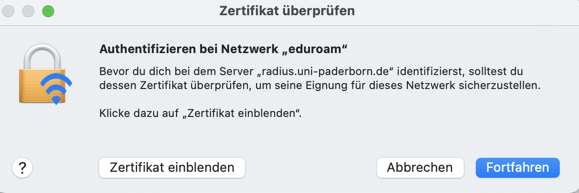
- Zertifikat einblenden to check certificate
- Continue to trust the certificate
- You may need to select your certificate again afterwards.
- Do not enter a username to log in to eduroam!


iPhone und iPad
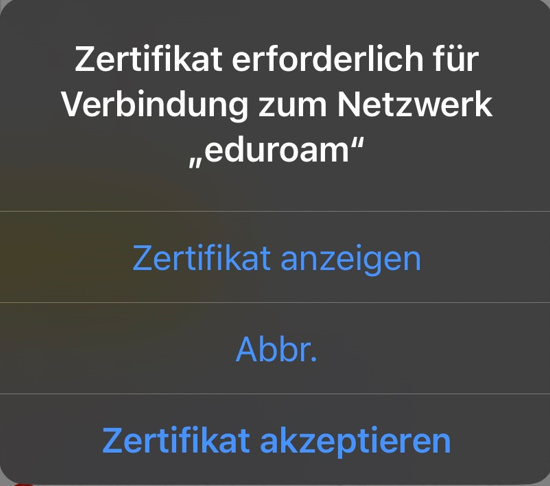
- Display certificate to check the certificate
- Accept certificate to trust the certificate

Windows

- Show certificate details to check the certificate
- Connect to trust the certificate
 Template documentation