Dozent: E-Mail-Erreichbarkeit (No-Reply-Mitteilung)/en
Die deutsche Version finden Sie auf der Seite Dozent: E-Mail-Erreichbarkeit (No-Reply-Mitteilung)
Lecturers can send messages (e-mails) to their participants about courses. Normally the recipients will not be able to reply, as a no-reply-address is displayed. This article will show how to change this setting so that students can reply to the email.
What needs to be done?[Bearbeiten | Quelltext bearbeiten]
- Profile
- Edit profile
- Change e-mail settings
Profile settings[Bearbeiten | Quelltext bearbeiten]
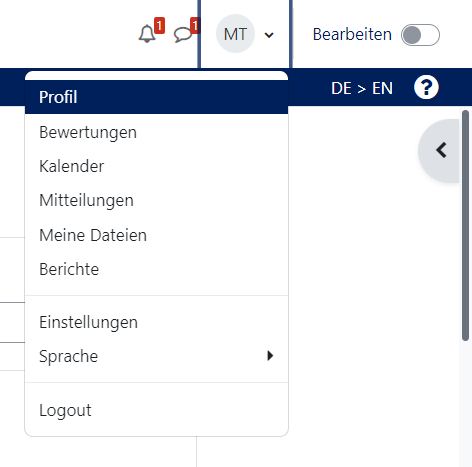
- After you have logged in, go to the small arrow next to your name and profile picture in the upper right corner and then to "Profile".
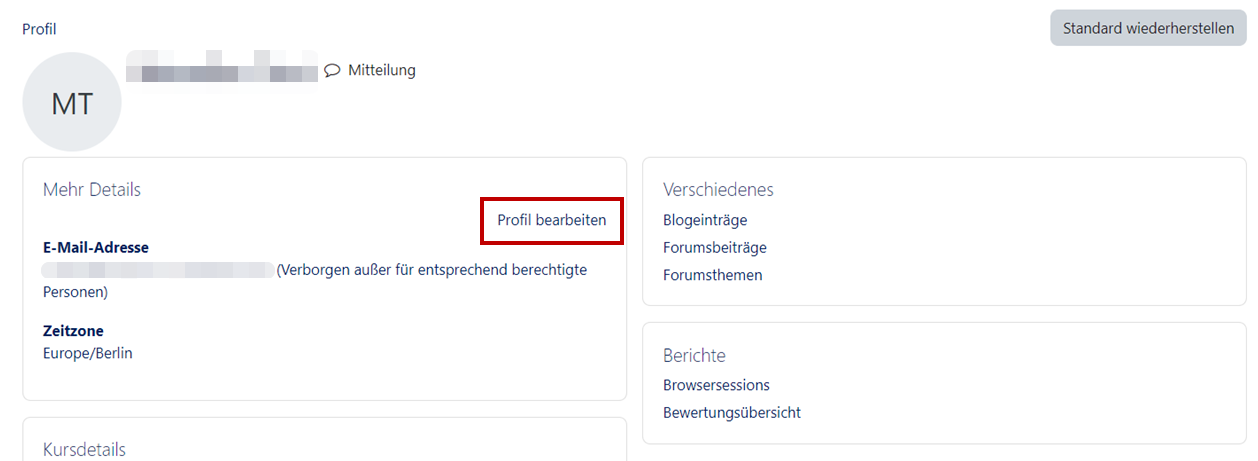
- Then go to "Edit profile".
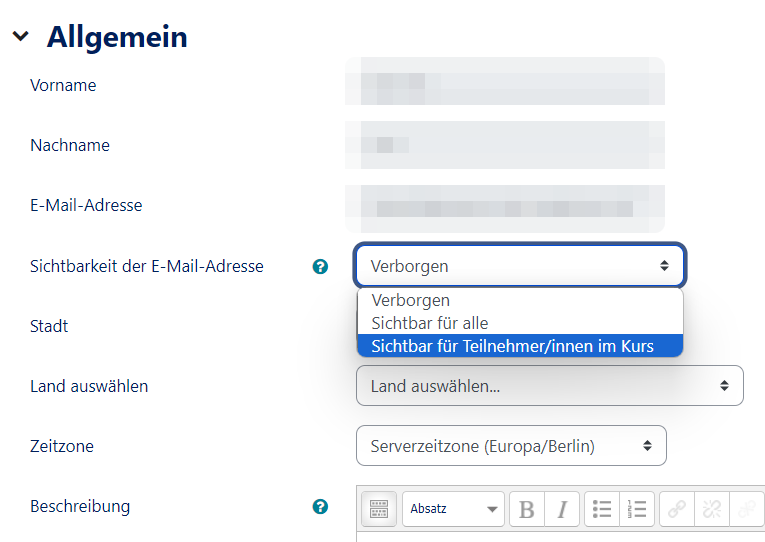
- After that you will reach your profile settings. Under "Show email address" you can now select your settings regarding your sender address:
- "Email address visible only to privileged people": e.g. teachers, managers, administrators will always see your email address.
- "Yes, visible to all": Everyone can see your email address.
- "Show email address to students": Only your students can see your email address.



.